Reaching into the cortex: steering a memory map with your bare hands
I gave the 3D memory map a webcam and a pair of hands. No mouse, no controller: you point, you grab, you pinch, and the galaxy of thoughts answers. Here's the build, and the small detour into decades-old HCI research that made it usable.
Wave at your own memory
A while back I turned an AI assistant’s memory into a 3D star map you can fly through: every glowing point a note, distance standing in for meaning, colour for age. It was a mouse-and-keyboard thing: scroll to zoom, drag to spin.
This is the sequel. I put a webcam behind it and asked a simpler, sillier question: what if you could just reach in with your hands?
Open the demo, cortex-demo.akciali.com, allow the camera, and there you are, dimmed into the background while a few hundred memories drift in front of you. Point a finger and the nearest thought lights up with its real text. Make a fist and grab the whole cloud to drag it around. Spread two fists to zoom. The map isn’t on a screen you operate any more; it’s in the room with you.
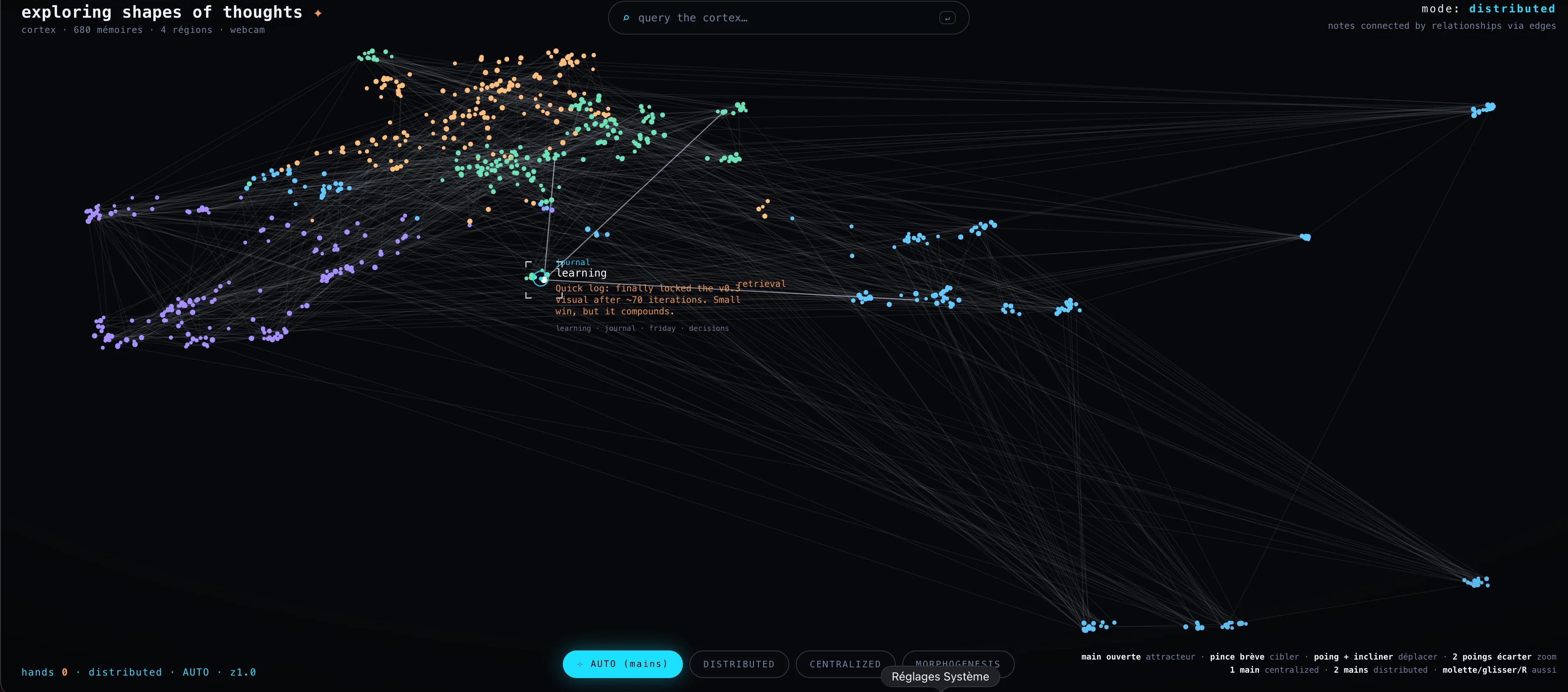
If you don’t have a webcam handy, the same thing works with the mouse: the cursor simply becomes the “fingertip”. But the camera is the fun part, so let’s start there.
Topologies of thought
The look owes an honest debt to a short film by the.poet.engineer called exploring shapes of thoughts: a person standing in front of a projected idea-graph that morphs between different shapes as they gesture. I wanted that, but wired to a real memory store instead of a render.
So the demo has three topologies, and you switch between them with your hands:
- Centralized: one focal thought, everything else connected to it. Show one hand and your fingertip becomes that focal point: every nearby memory reaches out to where you’re pointing.
- Distributed: the natural web. Show two hands and the map falls back to its real link structure, a quiet mesh of memories that reference one another; whichever you point at lights up its own neighbourhood, with the shared concept labelling the strongest edge.
- Morphogenesis: structure radiating outward from a single seed, lines bursting from your fingertip like a nervous system finding its shape.
One hand or two, open or closed: the posture of your hand is the command. Which sounds clean on paper. It was not clean in practice, and that’s the interesting half of the story.
How a hand becomes a cursor
The tracking is MediaPipe Hands, Google’s open-source on-device hand model (the Hand Landmarker task). Every webcam frame, it returns up to two hands as 21 landmarks each (knuckles, finger joints, fingertips) as plain x/y/z coordinates, computed entirely in the browser. Nothing leaves the machine; the camera feed never touches a server.
From those 21 points you can read everything you need: the index fingertip is the pointer, the distance between thumb and index tells you if the hand is pinching, and counting how many fingers are extended tells you if it’s an open hand or a fist.
The pointer drives an attractor: project the fingertip into the scene, find the nearest memory, light it up. There’s a deliberate bit of cheating here: pointing in mid-air is imprecise (more on that in a second), so the cursor snaps to the closest node rather than demanding pixel accuracy. You aim in the general direction; the map meets you halfway.
The hard part was never the detection
Here’s the thing nobody tells you: getting the hand tracked is a solved problem. Getting the hand to issue commands comfortably is where it all falls apart, and where I spent most of the time.
My first instinct was the obvious one: pinch to grab, then drag to pan the cloud. Pinch your thumb and index together, move your hand, the map follows. Everyone reaches for this because it mirrors a touchscreen.
It felt awful. Two things went wrong at once. First, holding a precise pinch while sweeping your arm across a large distance is genuinely tiring, and the hand tends to drift out of the camera’s view before you’ve panned far enough. Second, and this killed it, the hand naturally wants to close. Halfway through a drag your loose pinch becomes a fist, the gesture breaks, and the cloud either stops dead or, worse, keeps coasting.
This is the point where it pays to stop guessing and check whether someone smarter already mapped the terrain. They had, decades ago.
A detour through the literature
Two findings turned out to describe my exact misery.
The first: a study on mid-air hand interaction confirms that sustained pinch holds are ergonomically poor: prolonged pinching is uncomfortable and pushes people out of the tracking range, costing accuracy. Exactly the “my hand drifts away and closes” problem, named and measured.
The second is older and sharper. There’s a classic HCI distinction between position control (move the device, the thing moves the same amount, like a mouse) and rate control (displacement sets a velocity, like a joystick). The catch with position control is clutching: when you run out of physical room, you have to lift, re-grip, and go again. A celebrated piece of work called RubberEdge (Casiez, Vogel and colleagues) showed that rate control eliminates clutching entirely, that position control is better for precision, and that the sweet spot is often a hybrid.
So I had a real choice to make, not a hunch. I tried rate control first: make a fist, and how far you lean it from its starting point sets a scrolling speed. No clutching: you never run out of screen. But it had its own failure mode, and my tester (me, and then the actual user) summed it up perfectly: “the cloud runs away on its own.” A joystick keeps moving as long as it’s pushed; your body expects “I stopped moving, so it stopped.” Rate control violates that reflex.
The fix: let the hand do what it wants
The breakthrough was almost embarrassing. The gesture my hand kept trying to make, closing into a fist, was the one I’d been treating as a bug. So I made the fist the verb.
- Fist = grab. Close your whole hand and you’ve grabbed the cloud; move it and the map follows 1:1, position control; stop moving and it stops; open your hand and you let go. A fist is a stable, unambiguous posture: unlike a pinch, it doesn’t fall apart mid-motion. And because re-gripping a fist is effortless, the clutching that makes position control annoying with a mouse barely registers here.
- Quick pinch = target. A short pinch-and-release (no holding, no dragging) pins the memory you’re aiming at and centres on it. Brief, so it never has time to drift.
- Two fists, spread or squeeze = zoom. Two stable postures, small movement, no precision required.
- Open hand = explore. The default: just point, and the attractor follows.
The lesson generalises well beyond this toy: don’t fight the body’s defaults: assign meaning to the postures hands naturally fall into. Reserve precise, sustained gestures for the rare moments precision actually matters, and lean on coarse, comfortable ones for everything continuous.
Same engine underneath
None of this is a separate app. It’s the same memory map: the front-end pulls the same /api/graph the 3D version uses, with the real (well, real-shaped) memories and links, and the search box is wired to the same semantic endpoint. Type a query, hit return, and the matching memories ring up in cyan wherever they sit in the cloud; click a result and it pins, brackets snapping around it like a viewfinder. Hands or mouse, search or gesture, it’s all driving one underlying graph.
As with the 3D map, the instance you can touch is the public demo, seeded with entirely synthetic notes. The real memory it mirrors stays behind authentication and never ships a single byte to the browser. Same code, different data; the boundary is the data, not a login.
Why bother
A search box answers questions you already know to ask. Flying through a star map lets you notice things: a dense core forming around a topic, a lonely unlinked note. Reaching in with your hands adds one more register on top: it makes the thing feel inhabited. You stop operating a visualization and start rummaging through a space, and rummaging is exactly the mode in which you stumble onto the connection you weren’t looking for.
It started, like the last one, as a Friday “wouldn’t it be fun.” It ended with me re-reading twenty-year-old interaction papers to figure out why my hand kept closing. Worth it.
Go wave at it: cortex-demo.akciali.com. Make a fist and grab a thought.
Further reading
- MediaPipe Hands, the on-device model behind the tracking: source code · Hand Landmarker docs · the paper, Zhang, Bazarevsky et al., 2020
- RubberEdge: Reducing Clutching by Combining Position and Rate Control with Elastic Feedback (Casiez, Vogel et al.), the position-vs-rate-control tradeoff that explains why a fist-grab beats a joystick-pan: arXiv
- Exploring Mid-Air Hand Interaction in Data Visualization, measured ergonomics of mid-air pinches and gestures: arXiv
- Two-Handed Mid-Air Gestural HCI: Point + Command, one hand points, the other issues commands: Springer