One open image model, two engines: Krea 2 at home
The house used to share one graphics card between the children's drawings and the grown-ups' image experiments, with a switch, a morning timer and a lot of waiting. Krea 2 arrived as open weights, and the fix turned out to be running the same model twice: a small, quick, caged engine for the family, and a ComfyUI studio on its own card for the adults.
The card everyone wanted
In the last two notes, about the kids’ assistant and the grown-ups’ one, I mentioned in passing that drawings have “their own lane” and that the adults have “an image studio”. That sentence hides the most annoying month of the whole project.
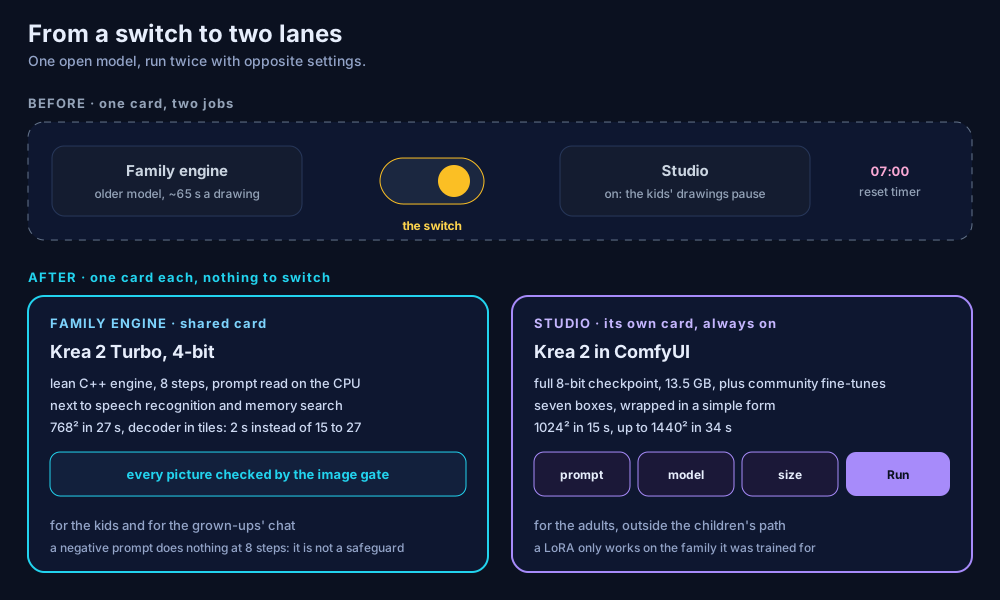
Until mid-September, one graphics card did two jobs. It ran the engine that draws for the children and for the chat, and it ran the grown-ups’ studio, where I wanted to try community image models one after the other. Both did not fit at the same time, so the house had a switch. Turn the studio on and the children’s drawings were paused, with a polite message. A timer turned the family engine back on at seven every morning, in case someone forgot.
It worked, technically. It was also the kind of design where everyone loses a little, all the time.
Why Krea 2 changed the plan
The family engine used to run a different open model. It was fine for a cartoon unicorn, slow for anything else, and its renders looked flat next to what the studio produced the moment I loaded Krea 2 in it.
Krea released Krea 2 as open weights in late June: a diffusion transformer of about twelve billion parameters, published as two checkpoints. Raw is the undistilled base, meant for fine-tuning and for training small add-ons called LoRAs. Turbo is distilled to produce an image in eight steps, without the second guidance pass that most image models need. ComfyUI supported it on day one, and the community started publishing fine-tunes within weeks. It ships under a community licence, free for individuals and small teams, with an explicit obligation to put safeguards in place, which the kids’ side already had.
That combination solved the problem in an unexpected way. I did not need two different models for two different audiences. I needed one model, run twice, configured for opposite goals.
The family engine: small, quick, caged
The family engine has three constraints. It shares its card with speech recognition and memory search, which together keep almost eight gigabytes busy. It must answer a child in well under a minute. And it must never be the thing deciding what a child sees.
So it runs Krea 2 Turbo through a lean C++ inference engine rather than a full Python stack, with the model quantised, which means its numbers stored with fewer bits. I measured three sizes on the real card, with everything else loaded:
- 8-bit: does not fit next to the other residents. End of story.
- 6-bit: a 768-pixel square in 25 seconds, the card at 17.7 GB.
- 4-bit: the same square in 27 seconds, the card at 14.6 GB, five gigabytes to spare.
Two seconds for five gigabytes of headroom is an easy trade, and for drawings meant for a tablet screen I could not tell the two apart. The 4-bit version won. The text encoder, the part that reads the prompt, runs on the processor instead of the card, which costs nothing noticeable.
The biggest gain came from somewhere I was not looking. The last step of an image model, decoding the result into pixels, needed a 7.8 GB buffer at once. On this card, that buffer spilled into system memory across a narrow connection, and decoding alone took between 15 and 27 seconds. Decoding the image in tiles instead brought the buffer down to under half a gigabyte and the step to two seconds. For comparison, the previous model on the same card spent 75 seconds on that step. No new hardware, one flag.
One detail matters for the children’s side. Because Turbo skips the guidance pass, the classic negative prompt, the list of things you ask the model not to draw, has no effect at all. It is not a safety feature here, and nothing pretends otherwise. The protection is where it always was: the instructions given to the model, and the image gate that checks every finished picture before anyone sees it.
The studio: seven boxes and a form
The grown-ups’ studio is ComfyUI, the open tool where an image pipeline is a graph of boxes wired together. It runs on its own card, on AMD’s compute stack, starts with the machine and never has to give anything back.
The full Krea 2 checkpoint, in an 8-bit format that community fine-tunes also use, weighs 13.5 GB. The whole graph needs only seven boxes: load the model, load the text encoder, load the decoder, write the prompt, make an empty canvas, run eight steps, decode. I wrapped it in ComfyUI’s app mode, so the everyday view is a plain form with a prompt, a model, a width, a height and a run button. The graph is one click away for the days I want to tinker.
On a fine-tune from the community, with nothing else on the card:
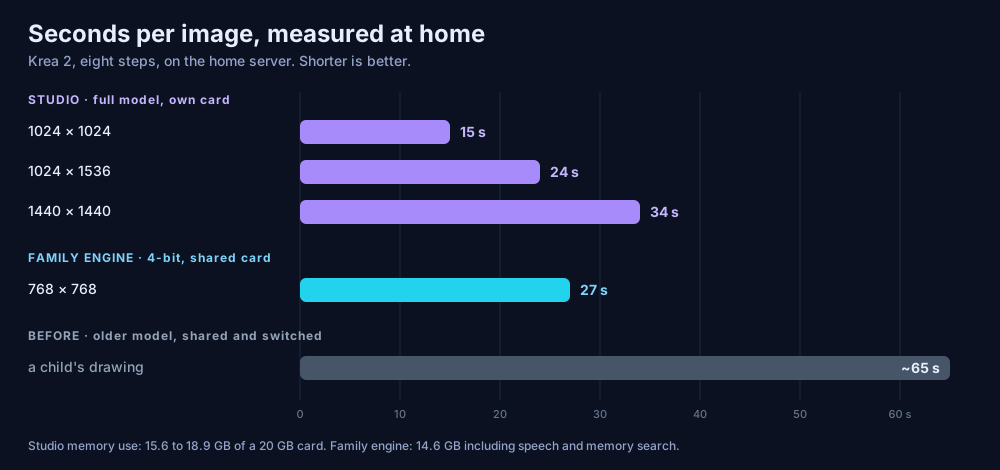
Krea advertises about two seconds for a large image on recent consumer hardware. On an AMD consumer card from late 2022, running AMD’s open compute stack, a 1024-pixel square takes fifteen. That is the honest price of the hardware I have, and it is fast enough that trying a dozen fine-tunes in an evening is a pleasure rather than a chore.
That is what the studio is for. Community models and LoRAs are browsed and downloaded from inside ComfyUI, with an add-on that also keeps them sorted. One rule saves a lot of confusion: a LoRA only works on the model family it was trained for. A Krea 2 LoRA on another base does nothing useful, so the studio keeps one form per family.
Two lessons from the plumbing
None of this was hard in the interesting sense. Two things were hard in the boring sense, and both are worth writing down.
A container forgets what you installed into it. ComfyUI add-ons often need extra Python packages. In the container I use, those packages land in a layer that is thrown away every time the container is recreated, while the add-on itself survives. The result is an add-on that works until the next update, then fails for no visible reason. The fix is a small script that reinstalls those packages each time the studio starts. I first mounted that script read-only, as a good habit, and the container crashed in a loop, because its start-up insists on changing the script’s permissions. Good habits need testing too.
“Never at the same time” is not the same as “one after the other”. Back when the two engines shared a card, I told the service manager that they conflicted with each other. That stops one when the other starts. It does not wait for the first one to finish stopping, so for a few seconds both lived on the card, and the memory overflowed. Declaring the order as well as the conflict fixed it, and I proved it in both directions. Today the question is moot, because the two engines no longer share anything. The lesson stays: a configuration change is proven by restarting the thing, not by reading the file and nodding.
What it changed
The switch is gone, along with the morning timer and the drawings are paused message. A child’s drawing went from about a minute to under half a minute, on a smaller and better model. The grown-ups’ assistant draws with the same family engine, and the studio is simply always there, for the evenings when one picture is not enough.
The two engines run the same open model with opposite settings: one small, quick and caged, the other large, patient and free. That is the pattern I keep coming back to on this server. When two audiences fight over one resource, sharing it more cleverly is rarely the answer. Giving each its own lane usually is.