Kinesis: the hand-steered memory map moves out
The webcam-and-hands experiment from June grew up and got its own address. Kinesis is now a standalone demo: four hand postures, a memory map that answers, a camera that never leaves your device, and a surprising answer to the question of what a gesture actually weighs. With interactive diagrams.
The experiment moves out
In June I gave a 3D memory map a webcam and a pair of hands: point a finger and the nearest thought lights up, make a fist and you are holding the whole cloud. It was bolted onto the existing star-map demo, the way experiments usually are: a fun wing built onto someone else’s house.
The wing kept growing, so it got its own house. kinesis-demo.akciali.com is now a standalone demo, and the family portrait finally makes sense: Cortex is the mouse axis (a real 3D star field you fly through), Kinesis is the gesture axis (a living memory map you steer with your bare hands). One idea per demo, each one free to be good at its own thing.
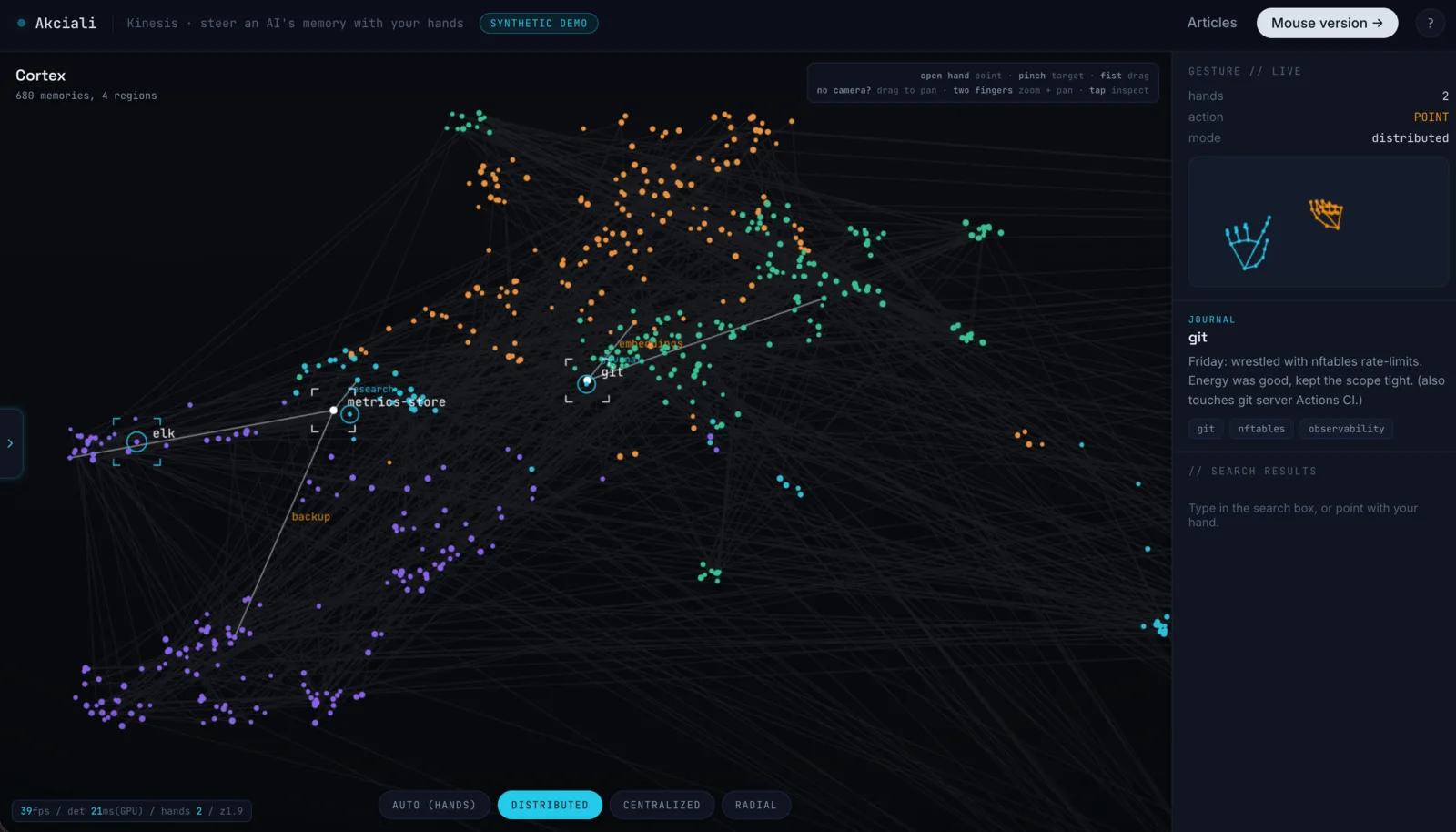
This piece is the release note, written for humans: what the hands actually say, why the camera feed never leaves your machine, and what a gesture turns out to weigh in megabytes.
Four postures, one language
The June write-up told the story of the pinch that failed: the “obvious” touchscreen gesture (pinch, hold, drag) is miserable in mid-air, because a held pinch is tiring and the hand drifts out of frame, something the ergonomics literature had already measured. The fix was to stop fighting the hand: the posture it keeps collapsing into anyway (a fist) became the verb. That lesson survived the move unchanged. The whole interface is still just four postures:
Schematic: the real demo tracks 21 landmarks per hand and reads the posture from them, every webcam frame, entirely in your browser.
What is new is that this vocabulary is no longer a local dialect. The same verbs now work across all three interactive demos: what your hand learns in Kinesis, it already knows in Cortex and Mesh. That is the oldest rule in the usability book, consistency: an interface you only have to learn once is an interface that feels like it was always there.
Your camera never leaves the room
A demo that asks for your webcam had better answer the obvious question first. Here is the entire journey of a video frame:
The hand model runs as WebAssembly inside the page. Frames go from the camera to the model to 21 coordinates per hand, and coordinates become verbs. The only network traffic is inbound, once, to fetch the machinery.
The tracking is Google’s open-source MediaPipe Hand Landmarker (paper, source), compiled to WebAssembly and served from my own box like everything else on the page. Every frame it returns up to two hands as 21 landmarks each, and those coordinates are all the demo ever looks at. No frame is uploaded, no landmark is logged, and the whole thing works offline once loaded.
The data on the map is just as contained, in the opposite direction. The 680 glowing thoughts you are rummaging through are a frozen, fully synthetic snapshot: four invented regions of notes, shipped as one static file. My real memory store, the one whose true shape I mapped here, stays home behind authentication. Same code, different data. The boundary is the data, not a login.
What a hand weighs
Here is the part that surprised me when I laid it out. Kinesis is by far the heaviest page I serve, and essentially none of the weight is the thing you came to see:
Uncompressed sizes as served from the repository; the wire is smaller. Everything is compressed once at boot and served straight from RAM, so a cold visit costs the pipe, never the CPU.
Read that top to bottom and the punchline falls out: the machinery that lets you touch the map is about 170 times heavier than the map. Seventeen megabytes of runtime and neural network, so that a tenth of a megabyte of thoughts can notice your finger. It is a very 2026 ratio, and an honest picture of where computation has moved: the server ships bytes exactly once, and from then on every frame of hand tracking runs on your silicon, not mine.
That ratio also dictated the engineering that shipped with the move. The heavy files are compressed at build and at boot, not per request (the WebAssembly binary compresses well, the model barely at all, so it travels as-is), everything is served out of RAM with proper caching headers, and the graph itself moved to a leaner wire format so the part of the page that is actually mine stays nearly free. On a small box, brotli at request time would be the self-inflicted wound: the same byte compressed a thousand times. Compress once, remember the result, serve memory.
No camera? No problem
The June version had an unadvertised failure mode: if the hand tracking could not start (no camera, no permission, an unhappy browser), it failed in silence and left you staring at a map that ignored you. That is fixed, and the fix came with a promotion for every other input. If tracking cannot run, the demo now says so and hands you the exact same verbs on whatever you do have:
- Mouse: the cursor is the fingertip, drag pans, the wheel zooms, a click inspects.
- Touch: new since the move. One finger drags the map, two fingers pinch-zoom, a tap inspects. The vocabulary maps one to one: a drag is a fist, a two-finger pinch is two fists, a tap is a pinch.
The camera is the fun way in, not the toll gate. Progressive enhancement, the old web virtue: the page works everywhere, and gets more alive the more your device offers.
Go wave at it
kinesis-demo.akciali.com: allow the camera, show it one hand, and point at a thought. Make a fist and take the whole cloud for a walk. If you want the story of how these gestures were chosen (and the two decades of interaction research that explained why my first attempt hurt), it is in the June write-up; if you want to know where this ladder of interfaces leads, that is the sequel on intention.
The experiment got its own front door. Come knock on it with your fist.
Further reading
- MediaPipe Hand Landmarker, the on-device model behind the tracking: docs · source · the paper, Zhang, Bazarevsky et al., 2020
- Exploring Mid-Air Hand Interaction in Data Visualization, the measured ergonomics behind retiring the held pinch: arXiv
- RubberEdge (Casiez, Vogel et al.), position vs rate control, and why a fist that moves the map one-to-one beats a joystick: arXiv
- Nielsen’s usability heuristics, consistency as the reason one gesture vocabulary now spans all three demos: nngroup.com
- Brotli, the compression that makes a 9.4 MB WebAssembly runtime tolerable on a small pipe: RFC 7932