From Ollama to llama.cpp on a single 8 GB GPU
A homelab migration off Ollama onto raw llama.cpp. Why I did it, what it bought, and the eight landmines in the path: model files that don't transfer, a CUDA image that won't match your driver, an OOM-ing build, glibc, and a dependency graph that fights back.
A field report on moving a small self-hosted AI stack off Ollama and onto raw llama.cpp: what went well, and the eight things that bit me on the way.
Update (June 2026): the 8B chat model described below has since been replaced by a 30-billion-parameter Mixture-of-Experts model running on the same 8 GB card, via CPU offload of the idle experts. See the sequel: A 30B model on an 8 GB GPU.
Why touch a working stack at all
My homelab runs a modest but real AI workload on a single 8 GB GPU (an RTX 2080, Turing, driver 550 / CUDA 12.4). One Ollama instance served the whole thing:
- an embedding model (EmbeddingGemma, 768-dim) feeding a memory/RAG service, an observability digest agent, a 3D memory visualizer, and a recall-quality eval batch;
- a narrative LLM (Ministral-8B) that writes one daily status digest.
It worked. So why move? Two reasons converged. First, an Ollama minor-version bump turned out to be a breaking engine re-architecture, and a six-version jump on the critical path of my memory system is not something I tap “update” on at 11pm. Second, and more honestly, Ollama is a wrapper around llama.cpp, and for my use case (one GPU, two models, a handful of low-QPS consumers) most of its value-add was thin: automatic model swapping and a REST API. Both are replaceable. The community grumbling about Ollama’s overhead and lagging-upstream behaviour is partly principled and partly hype, but the engineering case for my box was real.
So I tested it properly before committing (embedding drift, retrieval stability, throughput, VRAM) and the numbers said go. Then I migrated. This post is mostly about the part after “go”.
The target architecture (and the one good idea)
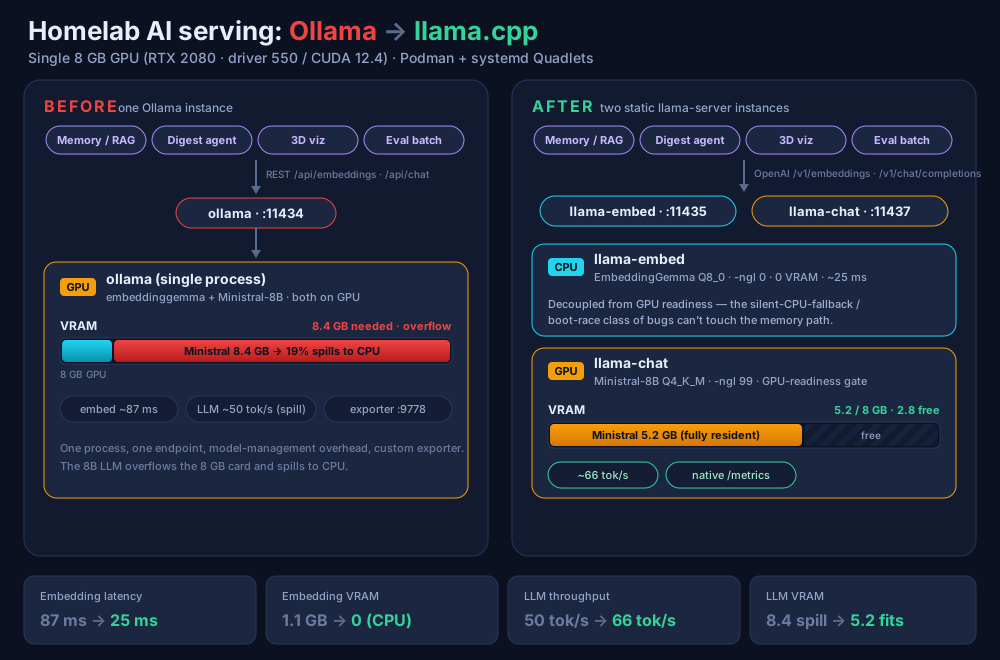
I replaced the single Ollama instance with two static llama-server instances:
llama-embed: on the CPU. EmbeddingGemma (Q8_0 GGUF),-ngl 0, serving an OpenAI-compatible/v1/embeddings.llama-chat: on the GPU. Ministral-8B (Q4_K_M GGUF),-ngl 99, serving/v1/chat/completions.
The one decision worth stealing: embeddings run on the CPU. A 300M embedding model on a 10-core CPU returns a vector in ~25 ms, about 3× faster than the same model went through Ollama on the GPU (~87 ms), because for a tiny model the GPU round-trip and the wrapper overhead dominate. Moving it off the GPU also frees ~0.5 GB of VRAM and, more importantly, decouples the critical embedding path from GPU readiness: the whole class of “GPU not CUDA-ready at boot, silent CPU fallback” bugs simply cannot touch the memory path anymore. The 8B narrative model stays on the GPU, where it fits fully (no CPU spill) and runs at 66 tok/s.
Both models would actually fit on the 8 GB card together (~5.7 GB), so no model-swapping proxy was needed. Two plain systemd-managed containers, each pinned and healthchecked. Simple beats clever.
Now the landmines, roughly in the order they detonated.
Landmine 1: Ollama’s model files don’t load on upstream llama.cpp
The obvious shortcut: Ollama already has the GGUF blobs on disk, so just point llama.cpp at them. Nope. Ollama repackages models with its own tooling, and upstream llama.cpp rejected both of mine with a tensor-count mismatch (expected 316, got 314 for the embedder; expected 531, got 309 for the LLM). The blobs are not portable.
Fix: pull proper GGUFs from Hugging Face (the official ggml-org build for the embedder, a community build for the LLM). Slightly annoying, but it also forces you to pick your quant deliberately instead of inheriting Ollama’s.
Landmine 2: the public CUDA image hates your driver
I grabbed the official llama.cpp:server-cuda image, ran it with the GPU passed through, and watched it quietly run on the CPU. The log told the real story:
ggml_cuda_init: failed to initialize CUDA: forward compatibility was attempted on non supported HW
warning: no usable GPU found
The public image is built against a CUDA newer than my driver (550 = CUDA 12.4 max) supports. It tried “forward compatibility” mode (a datacenter-GPU feature) and fell back to CPU on consumer Turing. This is the exact silent-CPU-fallback failure mode you migrated away from Ollama partly to avoid. The irony was not lost on me.
Fix: build llama-server yourself against your actual CUDA toolkit. Which leads directly to…
Landmine 3: building in a container with -j took down production
Naturally I wrote a clean multi-stage Dockerfile: build llama.cpp with CUDA inside nvidia/cuda:...-devel, copy the binary into a runtime image. The build step used cmake --build build -j: unlimited parallelism.
On a host with 20 hardware threads, that spawns ~20 concurrent nvcc processes, each compiling a large CUDA flash-attention kernel and each wanting several GB of RAM. The machine OOM-killed its way to a load average of 154, swap-thrashed, and restarted several production containers before I could pkill the build. Everything recovered on its own, but it was a genuine self-inflicted outage from a build.
Fix (two of them): cap parallelism (-j 6), and, better, don’t compile in a container at all. I already had a working host-built binary; I just packaged that into a runtime image. Seconds instead of half an hour, and no chance of OOM.
Landmine 4: glibc, the quiet killer of “just copy the binary”
Packaging the host binary into a runtime image seems trivial: FROM nvidia/cuda:...-runtime-ubuntu22.04, copy the binary and its .so files, done. It immediately died at startup:
/usr/local/bin/llama-server: /lib/x86_64-linux-gnu/libc.so.6: version `GLIBC_2.38' not found
... libstdc++.so.6: version `GLIBCXX_3.4.32' not found
The binary was built on a modern host (glibc 2.41) but the Ubuntu 22.04 base ships glibc 2.35. A binary built against a newer glibc will not run on an older one.
Fix: base the runtime image on something with a glibc ≥ the build host: I used debian:13-slim (glibc 2.41, matching the build box) and copied the CUDA runtime libraries straight off the host. The driver library (libcuda.so.1) you do not bundle: the container runtime injects it at GPU passthrough.
Landmine 5: decommissioning Ollama took its consumers down with it
This one is pure systemd, and it’s the kind of thing that feels obvious in hindsight. My consumer units had Requires=ollama.service in their Quadlets. The instant I stopped ollama.service to decommission it, systemd dutifully stopped every consumer too, and then they couldn’t restart, because their Requires= now pointed at a unit that no longer existed (Unit ollama.service not found).
Fix: repoint the dependency (Requires= / After=) to the new embedding server before you remove the old unit. Treat the dependency graph as part of the migration, not an afterthought. Better yet: prefer Wants= over Requires= for soft dependencies so a backend going away degrades a consumer instead of killing it.
Landmine 6: llama-server errors on long input instead of truncating
Ollama silently truncates an embedding input that exceeds the model context. llama-server does not. It returns a hard 500: input is too large to process. increase the physical batch size. My re-indexing job, which embedded a few hundred documents, blew up on the first long one.
Fix: set --ubatch-size ≥ your max input tokens, and cap input length client-side (a progressive shrink ladder: try full, then 7000/4000/2000 chars, mirroring what the old client did). It’s a behaviour difference worth knowing before it surprises a batch job.
Landmine 7: the consumers I forgot were consumers
I audited the “obvious” three services that talked to Ollama and migrated them cleanly. Then I decommissioned Ollama, and three other services fell over: a visualizer, its public demo, and an eval batch. All three were also embedding clients I’d simply never listed. They came down via the same Requires= cascade and threw monitoring alerts.
Fix / lesson: before you remove a shared backend, grep the entire fleet for who actually calls it (Quadlet env files, code, dependency lines), not just the services you remember. A shared embedding endpoint accretes clients quietly.
Landmine 8: a restarted server invalidates live client sessions
Smaller, but worth a line: restarting the memory service mid-migration left an upstream MCP client holding a dead streamable-HTTP session, which then 404’d in a loop. The server was perfectly healthy; the client needed to re-handshake. Anything stateful in front of a service you restart will need a reconnect. Plan for it.
What the migration actually bought
After the dust settled, with Ollama fully removed:
| Metric | Ollama | llama.cpp |
|---|---|---|
| Embedding latency | 87 ms (GPU) | 25 ms (CPU) |
| Embedding VRAM | 1.1 GB | 0 (CPU) |
| LLM throughput | 50 tok/s (spilling to CPU) | 66 tok/s (fully on GPU) |
| LLM VRAM | 8.4 GB (overflowing) | 5.2 GB (fits, ~2.8 GB headroom) |
| Metrics | custom exporter | native /metrics |
Faster on every axis, less VRAM, one fewer moving part (the custom exporter became llama-server’s built-in Prometheus endpoint). And the retrieval quality was unaffected: embeddings drifted slightly in absolute terms between the two engines (mean cosine ~0.975) but top-k retrieval against the existing index was identical, so a quick full re-index of a few hundred vectors made the store internally consistent again.
Would I do it again?
For this box, yes. But the honest takeaway isn’t “Ollama bad.” Ollama is a perfectly good way to get a model serving in thirty seconds, and for prototyping I’d still reach for it. The case for raw llama.cpp is when you have a specific constraint Ollama’s abstraction hides from you: here, a VRAM-tight single GPU where putting the tiny embedder on the CPU and keeping the LLM fully resident is measurably better, and where decoupling the critical path from GPU state is a real reliability win.
The migration is not hard. The landmines are what make it a weekend instead of an evening: model files that don’t transfer, a CUDA image that won’t match your driver, a build that can OOM your host, glibc, and a dependency graph that fights back the moment you pull the old service. None are deep: they’re just unsigned, and they’re all in the path. Now you have the map.
A short pre-flight checklist
- Pull GGUFs from Hugging Face; don’t reuse the old engine’s blobs.
- Verify a prebuilt CUDA image actually engages your GPU before trusting it; expect to build your own.
- If you build, cap
-j, or build on the host and only package in a container. - Match the runtime image’s glibc to your build host.
- Repoint every consumer’s
Requires=/After=to the new backend before removing the old unit, and grep the whole fleet for who the consumers actually are. - Re-index your vector store after switching embedding engines, and validate retrieval, not just cosine similarity.