A 30B model on an 8 GB GPU: a small win with Mixture-of-Experts
The sequel to moving my home AI stack onto llama.cpp. I wanted better reasoning without buying hardware, so I tried to run a 30-billion-parameter model on a single 8 GB card. With a Mixture-of-Experts model and CPU offload, it fits, and it's quick. The numbers, and the gotchas. With an interactive config explorer.
A small, satisfying win
A while back I moved my small home AI stack off Ollama and onto raw llama.cpp, running on a single 8 GB GPU: an RTX 2080, a card old enough to vote in dog years. The chat side was an 8-billion-parameter model that fit comfortably on the card; an embedding model ran on the CPU. It worked well, and I left it alone.
But I wanted more: better reasoning, and noticeably better French, for the one job that model does: writing a short daily status digest. The obvious path was a bigger model, and the obvious objection was that I had no bigger GPU to put it on. This is the story of getting a 30-billion-parameter model to run on that same 8 GB card anyway. It is a small thing. It was also very satisfying.
Why 30B “doesn’t fit”, and why that’s the wrong intuition
A 30B model at a sensible 4-bit quantisation is roughly 18 GB on disk. An 8 GB card cannot hold that. End of story: if the model is dense, meaning every parameter is used for every token.
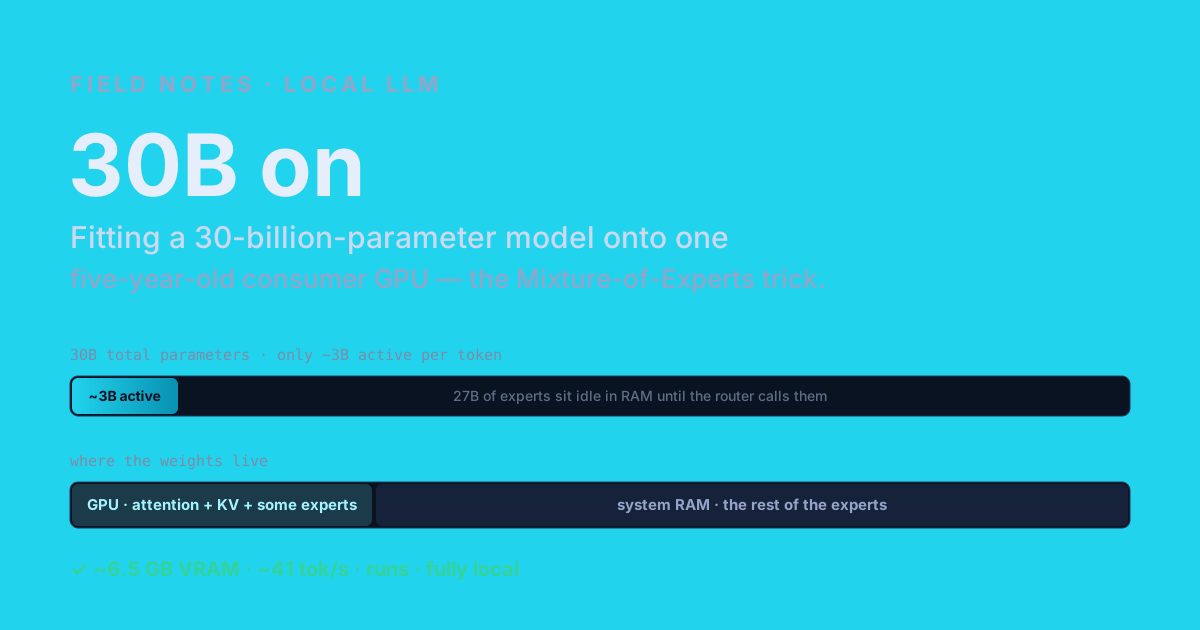
The escape hatch is a Mixture of Experts (MoE). In a MoE model the feed-forward layers are split into many small “experts,” and a little router picks only a handful of them for each token. The model I used, Qwen3-30B-A3B, is exactly this: 30B total parameters, but only about 3B active per token (that’s what the A3B means: roughly three billion active). The other ~27B are real and necessary, but on any given token most of them sit idle.
That changes the arithmetic completely. You no longer need all 30B on the fast, expensive GPU at once. You need the small always-used part (the attention machinery and the running KV cache) to be fast, and you can leave the big pile of experts somewhere cheaper, pulling each one in only when the router actually calls it.
The knob that makes it fit
llama.cpp gives you exactly that lever. --cpu-moe keeps all the expert weights in system RAM and only the attention and KV cache on the GPU. --n-cpu-moe N is the dial: keep the experts of the first N layers in RAM, and let the rest live on the GPU. Crank N up and you lean on RAM (slower, tiny VRAM footprint); crank it down and you pull more experts onto the card (faster, until you run out of VRAM). It is a smooth gradient between “barely uses the GPU” and “won’t fit,” and somewhere on that line is the sweet spot for your card.
Here are the actual measurements on my box (RTX 2080, 8 GB; Qwen3-30B-A3B at Q4_K_M, 4k context). Click through the configs:
Same weights in every row, so the answer quality is identical: only the speed/VRAM trade-off moves. For comparison, the old dense 8B chat model ran at ~66 tok/s using 5.2 GB.
The shape of it is the whole lesson. Going from all-CPU to a few experts on the GPU roughly doubles the speed; past that, pushing more experts onto the card buys nothing but eats your headroom. So I settled on --n-cpu-moe 34: about 41 tokens per second, ~6.5 GB of VRAM, and ~1.5 GB to spare. The old 8B was faster on paper (~66 tok/s) and a bit leaner, but this is a 30B-class model answering in its place, at the same hardware budget, and the jump in reasoning and French is exactly what I was after. For a once-a-day batch job, 41 tok/s is plenty.
The gotchas, because there are always gotchas
It was not quite a one-liner.
The first surprise: the CUDA build of llama-server refuses to start without a GPU attached at all, even when you ask it for a pure CPU run to benchmark the all-CPU baseline. It wants to initialise CUDA before it will do anything, so the “no GPU” test still needs the GPU passed into the container. Mildly absurd, easy to lose an hour to.
The second: a 30B model is an 18 GB file, and loading it cold takes a while. The service was timing out on startup until I gave it a longer health-check grace period. Once warm it is fine; the cost is paid once.
The third was sourcing: I had to fetch a community-built GGUF because the official release didn’t publish the plain 4-bit variant I wanted. Worth a glance at who built any weights you pull, the same way you’d glance at any other dependency.
And the safety net: I kept the old 8B file on disk. Swapping back is one config line and a restart, so trying the big model cost me nothing but an evening.
Why this is more than a party trick
The satisfying part isn’t the tokens per second. It’s that the goalposts moved. “What size model can I run at home?” used to be answered by your VRAM, full stop. Mixture-of-Experts plus a runtime that will spill the idle experts to RAM changes the question to “how much of the active part can I keep on the card?” And the active part of a 30B MoE is small. A five-year-old gaming GPU now runs a 30B-class model, fully local, with room to spare.
It started, like most of these, as a “let’s see if it even loads.” It ended with a better model doing the same quiet job, on the same hardware, for the price of an evening and 1.5 GB of headroom. Small win. I’ll take it.
Further reading
- The predecessor: From Ollama to llama.cpp on a single 8 GB GPU.
- llama.cpp: the inference engine, and the
--cpu-moe/--n-cpu-moeflags used here. - Qwen3: the model family; the variant here is Qwen3-30B-A3B (30B total, ~3B active).